Two mixes, one app
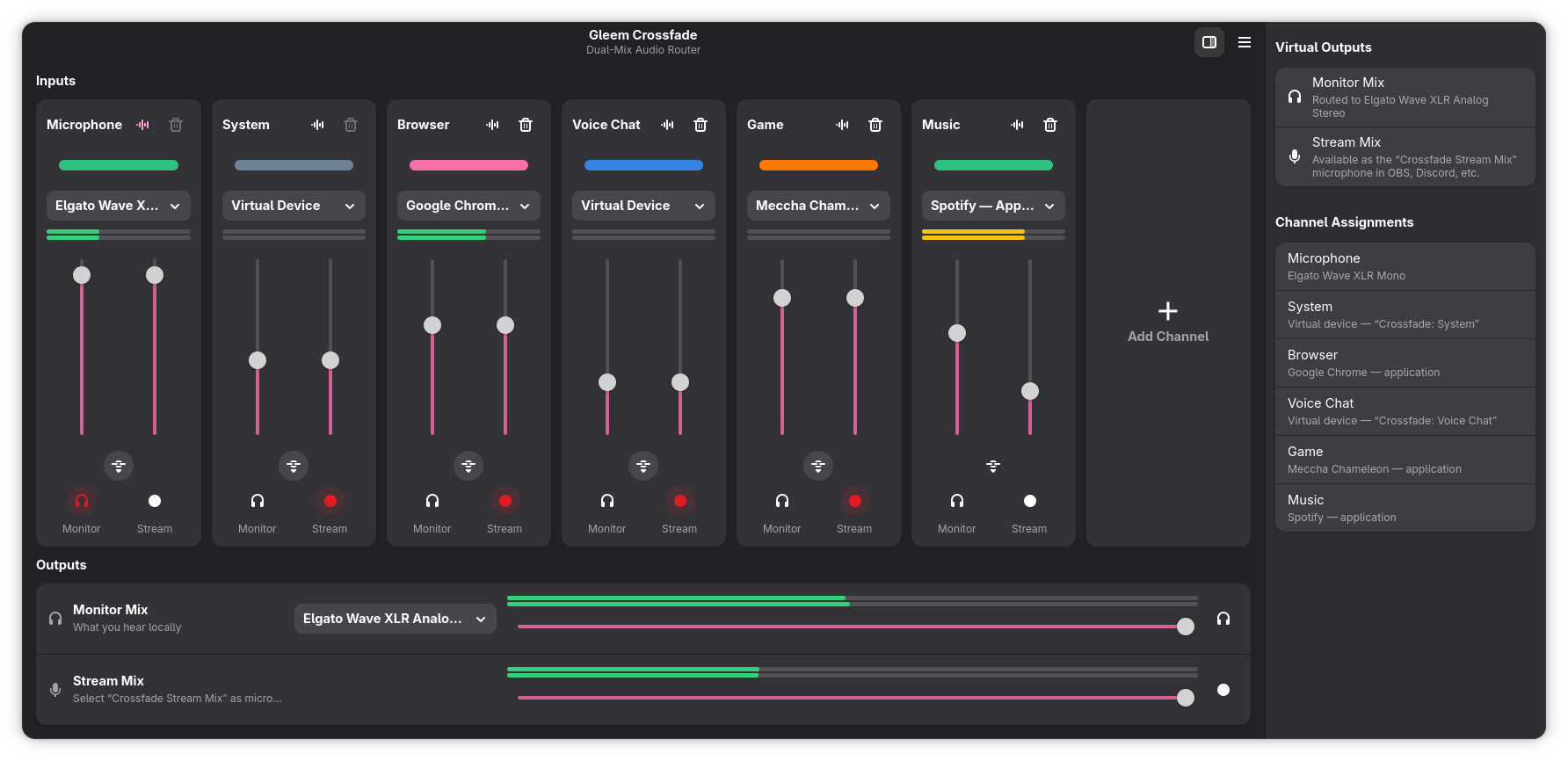
Up to eight channels — mic, game, music, voice chat — each with independent Monitor and Stream faders. Blast music in your headphones while your audience hears it quietly — or not at all.
Free & open source · Built for Linux
Gleem Crossfade routes every microphone and app into two independent mixes — what you hear in your headphones, and what your audience hears in OBS, Discord or Zoom. Inspired by Elgato Wave Link, but free, open source, and without any special hardware.
Why Crossfade
Crossfade sits between your audio sources and the apps that record them, so you control exactly who hears what.
Up to eight channels — mic, game, music, voice chat — each with independent Monitor and Stream faders. Blast music in your headphones while your audience hears it quietly — or not at all.
Enable the optional VOD Mix for a third mix with its own virtual microphone. Record it as a separate track in OBS: music stays live on stream and never reaches the VOD.
Chain noise suppression, gates, compressors and EQs per channel — with live sliders in Crossfade or the plugin’s own editor window. Plugins run out-of-process, so a crash never takes your audio down.
Right-click any fader, move a knob on your MIDI controller, done. Binding profiles, LED feedback and fader pickup turn an APC mini or Launchpad into a mixing desk — and bindings survive replugging.
The stream mix shows up as a normal microphone, and channels can appear as system output devices. OBS, Discord and Zoom just work — no plugins needed.
Toggle mutes and set volumes from Stream Deck software, desktop shortcuts or shell scripts. A cough button is one command away.
Crossfade re-attaches streams and re-applies volumes if the session manager moves them, waits for slow USB mics at login, and cleans up after crashed sessions. Set it up once — it stays set up.
True dBFS peak meters with ballistics tuned to feel like OBS’s fast meter — green up to −20 dB, yellow to −9, red when you clip. Stereo on every channel and every mix.
Close the window and your mixes keep running. Start Crossfade at login, and let the built-in audio setup assistant check your routing and fix it with one click.
Getting started
Grab the package on Fedora or Arch, or build from source. All you need is PipeWire — the default on modern distros.
Point channels at your mic, browser, game and music apps. Colors and templates keep everything readable at a glance.
Select "Crossfade Stream Mix" as the microphone in OBS or Discord, and your headphones as the monitor output.
Ride the faders while you stream — from the app, your MIDI controller or a Stream Deck. Crossfade keeps the routing healthy.
Install
Crossfade needs PipeWire with pipewire-pulse — the default audio stack on Fedora, Ubuntu 22.10+ and most modern distributions.
sudo dnf copr enable gleem/crossfade
sudo dnf install gleem-crossfadeyay -S gleem-crossfadegit clone https://github.com/gleem-gg/crossfade
cd crossfade && make && make installOptional extras: LV2 plugins like RNNoise for noise suppression, and Carla for VST2/VST3 hosting. Full instructions in the README on GitHub.
Good to know
Yes. Crossfade is open source under the Apache 2.0 license and free to download and use. It is part of the Gleem streaming tools and lives on GitHub.
No. Crossfade was inspired by Elgato Wave Link but works with any microphone and audio interface. If you do own a Wave XLR, Crossfade ships dedicated support that works around known firmware quirks.
Anything running PipeWire — the default on Fedora, Ubuntu 22.10+ and most current distros. Packages exist for Fedora (COPR) and Arch (AUR), and building from source works everywhere else.
Yes. The stream mix appears as a regular virtual microphone called "Crossfade Stream Mix" that any app can record, and channels can appear as system output devices. No plugins required.
Three ways: a channel can capture a device directly (your mic or line-in), follow an application by name so its audio is pulled in automatically (Spotify, your browser, a game), or appear system-wide as its own output device named "Crossfade: <channel>" that you point any app at.
Crossfade is a native Linux app built on PipeWire and GTK4, so it is Linux-only. On Windows, Elgato Wave Link covers this ground; on macOS, tools like Loopback do.
Free forever · Apache 2.0 licensed
Split your monitor and stream mixes in minutes — no hardware, no subscriptions, no plugins.